

Five Maia Prompts That See the Whole Portfolio at Once
Volume 1 of this series covered the Maia prompts that replace a lot of assembly work – the portfolio review, the board pre-read, the variance run that used to eat-in to the working week. This next selection goes wider. These are the pattern-finders; the ones that pay off when Maia looks across the portfolio at once.
These are harder to run by hand precisely because they require holding the whole portfolio in view, which is exactly what Maestro and its context layer makes routine. Here are five cross-portfolio Maia prompts that clients are running today and seeing immediate impact…
1. Margin and cash watch
Understanding which companies are under financial pressure is the foundation of good portfolio support and reserve planning. This example runs a standing check across the portfolio for the warning signs that matter — margin compression versus plan and prior year, EBITDA trajectory bending the wrong way, or a cash and runway position crossing a threshold you define.
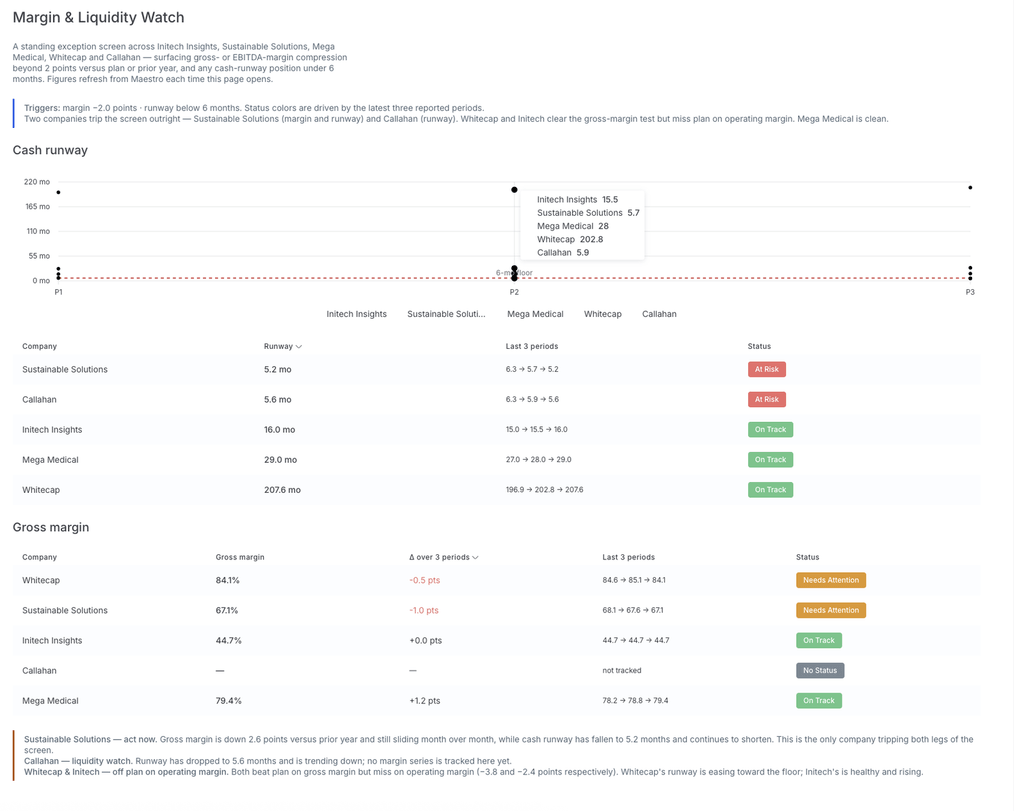
Maia compares the latest figures against plan, against the prior period, and against your firm’s own tripwires, then returns only the companies that breach them. Instead of reading every report to find the two that matter, you get the two flagged straight away.
2. The cross-portfolio theme finder
Three PortCos slowing on net-new bookings in the same quarter is a market signal, not three coincidences. A margin squeeze showing up in the same sector tranche is a theme worth raising at the next IC. This asks Maia to identify the patterns moving in the same direction across the portfolio this period — the kind of synthesis that’s nearly impossible to do by paging through individual reports.
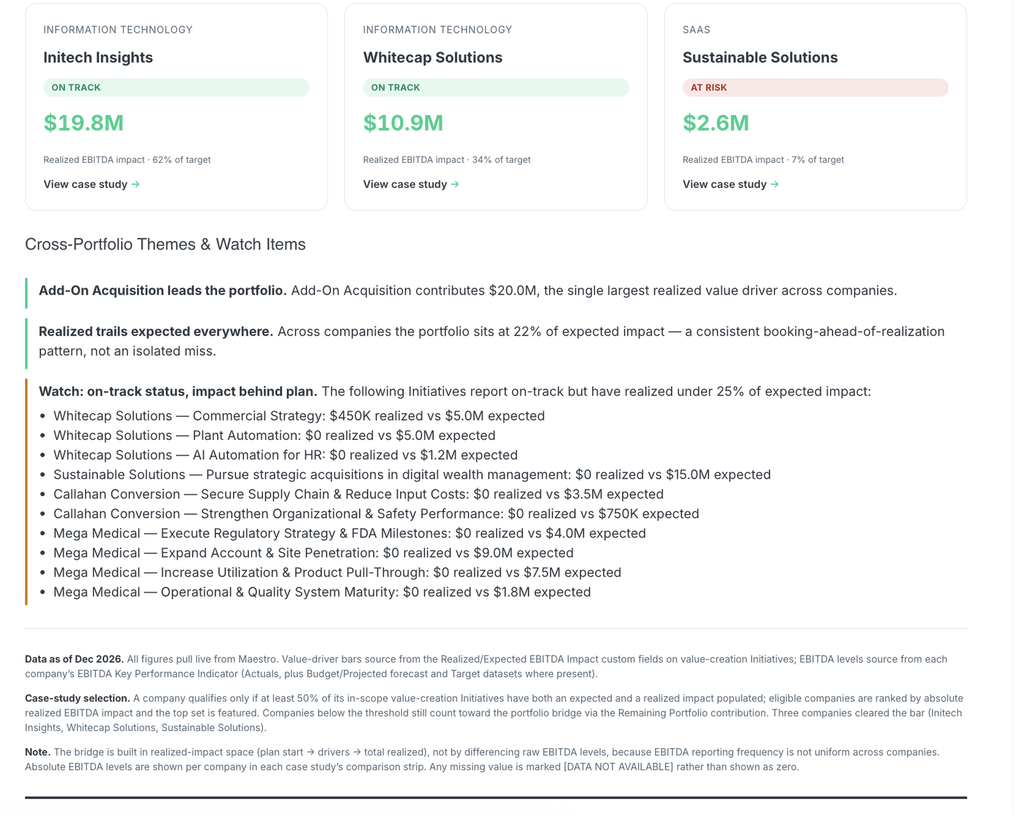
Maia looks across all companies to identify the top three to five themes: metrics or trends moving the same direction across multiple companies (e.g., broad bookings softness, margin compression, pipeline build, hiring slowdowns), and notes whether it looks like a market signal or company-specific.
3. Initiative-to-outcome
Initiatives are easy to launch and hard to close the loop on. Six months later, the honest question “did this actually move the metric it was supposed to?” often goes unanswered because the initiative lives in one place and the KPI lives in another. This connects them.
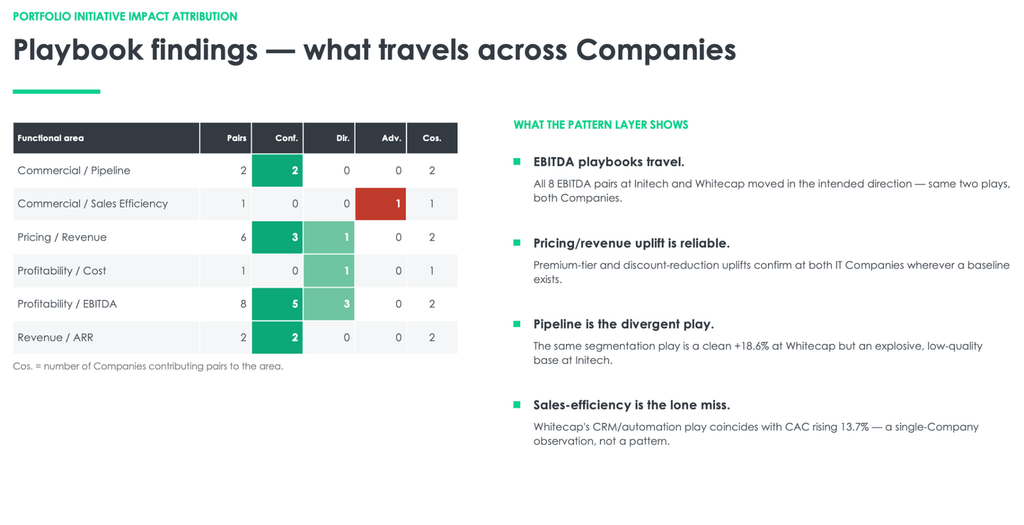
Maia traces a specific initiative to the outcome it was meant to drive and reports whether the metric moved, by how much, and over what timeframe: it’s how a value-creation program builds an evidence base instead of an activity log.
4. The “what changed since last quarter” digest
Between quarters, the useful question is rarely “how is everything doing” — it’s “what changed.” A new status on a stage gate, a metric that swung, a target that slipped, an update that signals a shift. This example asks Maia to produce a per-company digest of deltas since the prior period: it’s the catch-up read for anyone walking into a portfolio conversation who doesn’t have time to re-read everything.
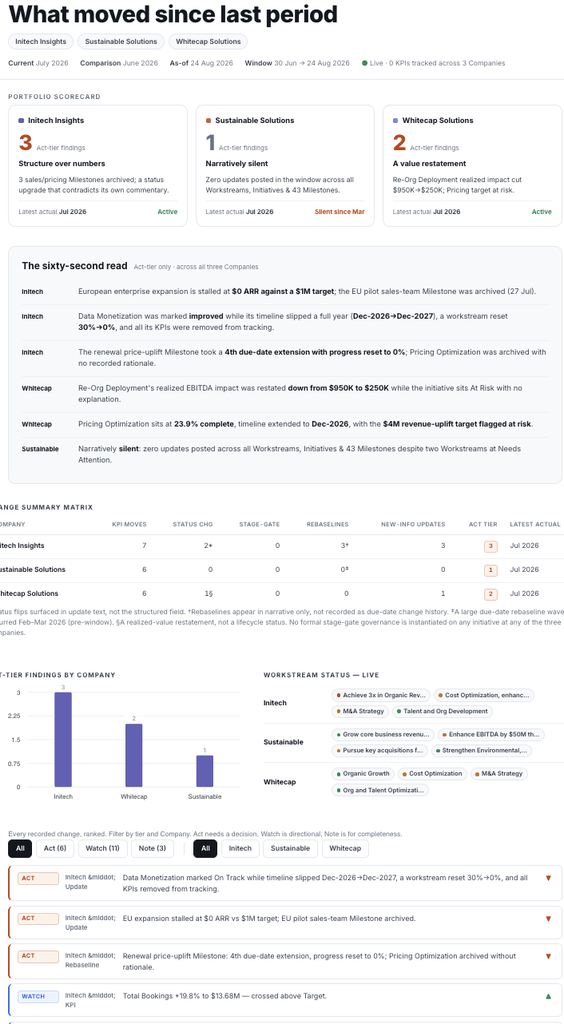
Maia summarizes what has changed for each company since the previous reporting period: material movements in key financial metrics, any change in status or stage-gate progress, and notable new qualitative updates.
5. Data quality and readiness check
Bad data erodes trust faster than a bad quarter — a metric reported differently than last period, a figure that doesn’t tie out, a KPI that’s stale or missing right before a partner or LP sees it. This prompt turns Maia into a data-readiness check that runs before the review, not after the issue. Your team still owns the cleanup, but the obvious issues get caught before they reach the people whose trust you’re trying to keep
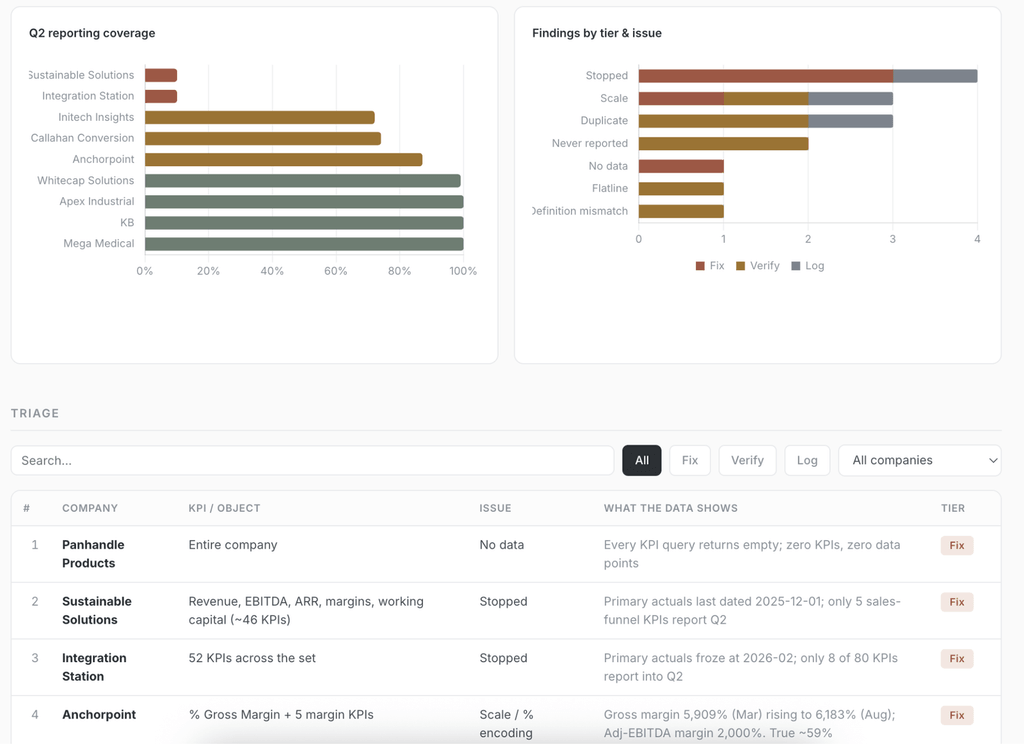
Maia runs a data-quality check for the most recent period: flags metrics that changed definition or sign vs. prior periods, figures that don’t tie out (e.g., quarterly totals that don’t sum to annual) and returns a ranked triage list with the company, the issue, and why it’s worth checking.
What makes a good Maia prompt?
All the prompts above work for the same reason: they draw on structured, mapped, reliable portfolio data and your value creation context in Maestro, and do specific, scoped work.
The second in our series exploring Maia use-cases, coming soon: creative ways clients are using Maia, plus most useful Maia prompts for PortCo management teams. To learn more about what Maia can do across your portfolio, speak to the team at hello@go-maestro.com and see it in action